Guide · EmbeddingGemma 2
How DigUp uses EmbeddingGemma 2 for on-device multimodal search Photos, PDF pages, documents, audio windows, video frames, and optional code share one ranking space. DigUp embeds them with Google DeepMind’s EmbeddingGemma 2 through llama.cpp on your machine. Based on DigUp (MIT). Not affiliated. DigUp is not Google-official.
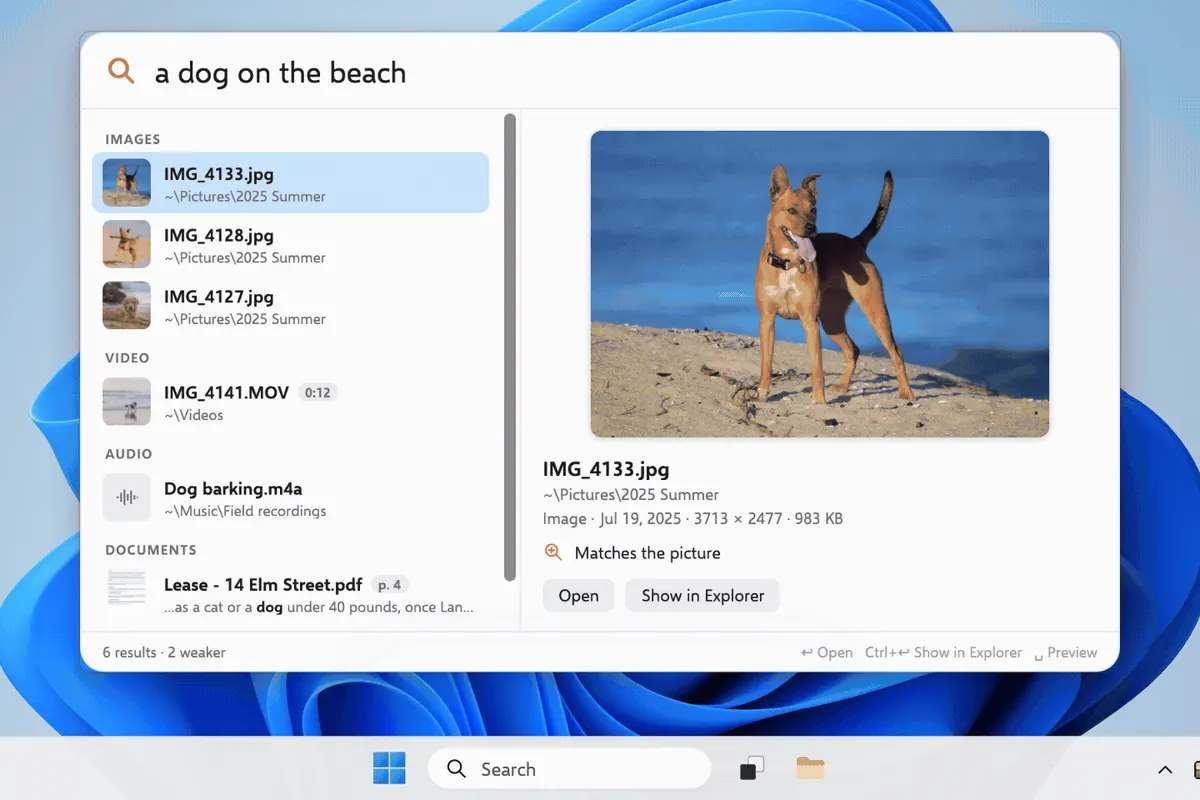
One query · many modalities Still from DigUp demo.gif (MIT) — VIDEO / IMAGES / AUDIO / DOCUMENTS together. Sourced snapshot (2026-10-15) Fact Value Source EmbeddingGemma 2 ~740M params · unified 768-d multimodal space · Apache 2.0 weights Google AI docs DigUp package ~865 MB Q8 GGUF (~310 MB text + ~555 MB mmproj) DigUp README / ModelFiles Runtime llama.cpp · Metal (Mac) · CPU/Vulkan (Win/Linux) DigUp README Versions Mac 0.6.1 · Win/Linux 0.7.0-beta.1 GitHub Releases Stars ~3,768 · forks ~254 GitHub API
Pipeline DigUp documents Stage What happens Where it runs 1. Folders you choose Readers turn files into pictures, text, sound Your disk only 2. EmbeddingGemma 2 llama.cpp helper embeds chunks; quits when done On-device GPU/CPU 3. SQLite index Vector per image/page/passage/frame/30s audio + keywords Application Support / XDG 4. Your query Text tower embeds words → nearest vectors + exact-word boost Milliseconds on device
Modality checklist Modality DigUp behavior (README) Try querying Images By what they show; Mac screenshot OCR for text “dog on the beach” PDFs Page by page; scans included; first 30 pages fast “clause about pets in the lease” Docs txt/md/rtf/docx/odt/html (+ Mac .doc) Concept phrases Audio Overlapping ~30s windows “where they talk about sleep” Video Frames every few seconds + soundtrack “zebra in a video” Code (opt-in) code: prefix; separate indexcode: retry with backoff
Numbered setup Download DigUp: Mac DMG , Windows , or Linux .deb / AppImage . Launch and finish EmbeddingGemma 2 (~865 MB). If Hugging Face is blocked, Settings → Storage → Use Files… (#25). Pick folders. DigUp never downloads cloud-only files. Read the first-pass time estimate from the local speed check. Hotkey: ⇧⌘Space (Mac) or Ctrl+Shift+Space (Win/Linux). Describe meaning. Optional: enable code search; query with code:. If results stay empty: 0 files indexed . If fans roar: battery & hours . FAQ-style cause → fix Cause Fix Model download stuck Use Files… with the two GGUFs DigUp checksums — FAQ Cloud placeholders Download Now in Finder/Explorer first Code never appears Enable code folders + code: prefix (#21) CPU-only photo crawl slow (Win/Linux) Expected; check speed.log for gpu vs cpu — beta guide
Role playbooks Same model, different jobs — browse DigUp use cases by role (developers, clerks, accountants, students, lawyers, and more).
 DigUp
DigUp