 DigUp
DigUp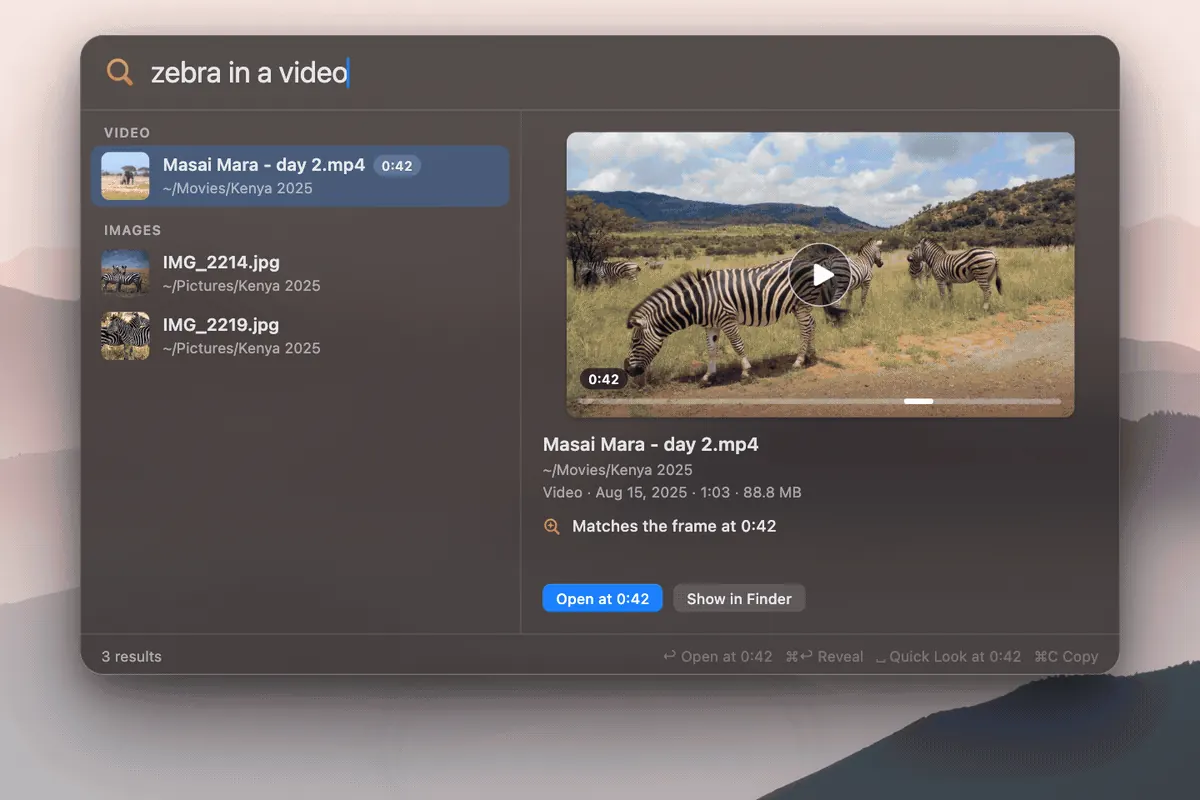
Prerequisites
| Requirement | Detail |
|---|---|
| Chip | Apple Silicon (M-series). Intel Macs are not supported by the DigUp Mac build. |
| OS | macOS 14 (Sonoma) or later |
| Disk / network | ~865 MB for the EmbeddingGemma 2 model on first run; stable download path |
| Version | 0.6.1 stable · asset DigUp-0.6.1.dmg |
DMG from ARahim3/DigUp Releases
A Homebrew cask is not published yet. Use the Mac DMG download below.
- Download
DigUp-0.6.1.dmg(direct Release asset). - Open the DMG and drag DigUp to Applications.
- Launch DigUp; complete first-run model download and folder selection.
First-run checklist
- Model download (~865 MB) — required once; stays on device.
- Pick folders — only selected folders are indexed; undownloaded cloud placeholders are skipped.
- Time estimate — DigUp estimates the first pass from a quick speed check on your Mac.
- Hotkey — search panel: ⇧⌘Space (Shift + Command + Space).
- Keyword boost — exact strings (invoice IDs, error codes) still help; try natural language for photos and PDFs.
Troubleshooting
- Network blocks the model download — In Settings → Storage, use Use Files… to point at the two model files you downloaded elsewhere (added in 0.6.1). DigUp verifies them before use.
- IME / composed text — 0.6.1 fixed Korean/Japanese/Chinese composition breaking the search field.
- Folder names with accents / CJK — 0.6.1 fixed indexing stopping for all folders when one path had non-ASCII names.
- Updates — DigUp → Check for Updates…, or reinstall from the latest Release asset.
Plain-English release summary: Changelog notes. See changelog notes for a summary.
Sourced numbers (2026-10-15)
| Fact | Value | Source |
|---|---|---|
| Mac version | 0.6.1 | ARahim3/DigUp Releases |
| Model download | ~865 MB | Upstream README / release notes |
| Stars | ~3,716 | GitHub API |
| License | MIT | Repo |